
The Problem
Tableau Cloud gives you a rich Activity Log. User logins, dashboard views, permission changes — it’s all there. The catch? It’s delivered as a stream of polymorphic JSON files.
“Polymorphic” is a fancy way of saying: a `security` event and an `access_content` event share almost no fields. The schema changes depending on what happened. Our goal was to take this mess and turn it into a clean, structured Silver Layer — all 193 unique fields, nothing lost.
Sounds straightforward. It wasn’t.
The First Attempt (and Why It Failed)
Our first instinct was to use BigQuery’s native Data Transfer Service (DTS) to load the JSON files directly from S3. Clean, simple, minimal moving parts. In theory.
In practice: two specific problems killed it.
1. Polymorphic Chaos. BigQuery’s JSON loader assumes a reasonably consistent schema. Tableau logs don’t have that. Because the structure shifts based on `eventCategory`, auto-detection either crashed or silently skipped rows with “unexpected” fields. Neither outcome is acceptable in an audit log.
2. The Quoting Nightmare. JSON strings are wrapped in double quotes. CSV and JSON parsers frequently get confused when those strings contain nested quotes or special characters. The result was truncated data — which, again, is not something you want when you’re building a compliance layer.
The lesson: ingestion and parsing need to be decoupled. We moved the files from S3 to Google Cloud Storage (GCS) and built a “Pseudo-CSV” staging area as the bridge.
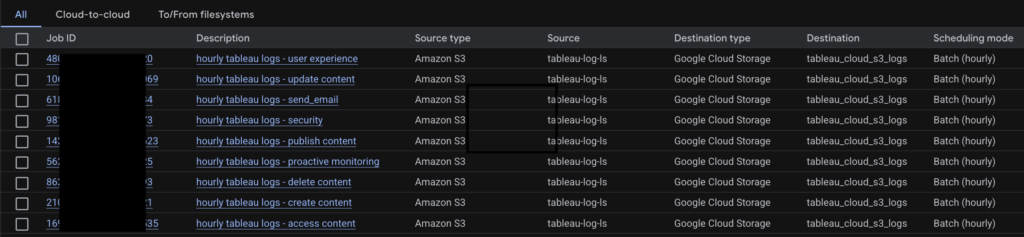
The Ingestion Layer: Treating JSON Like a Single-Column CSV
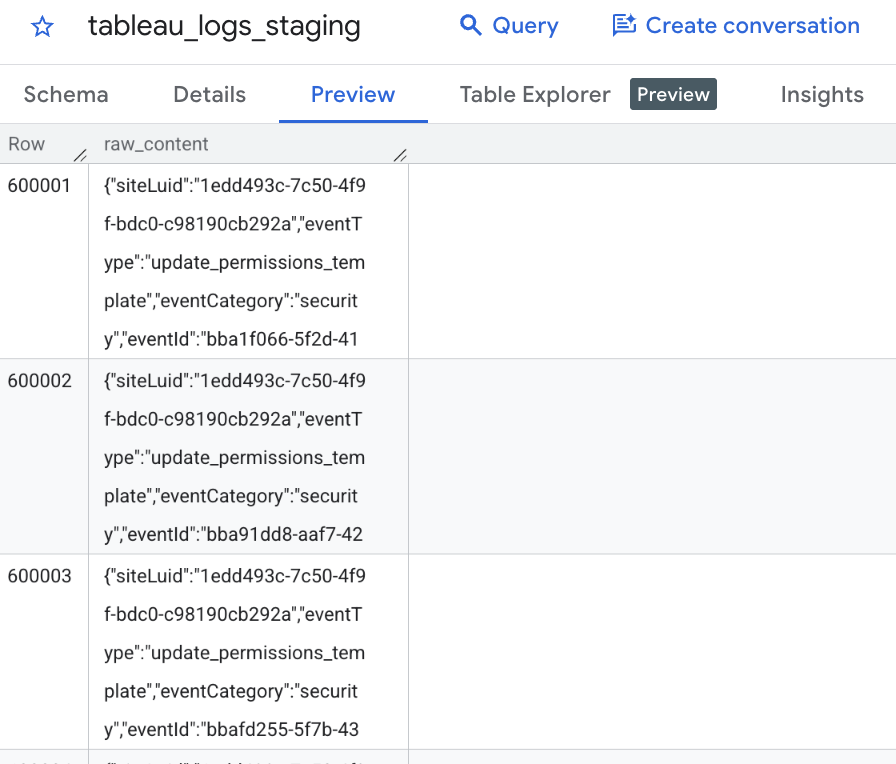
This is the part that feels wrong until it clicks. We loaded each JSON file as if it were a one-column CSV — the entire JSON blob sitting in a single field. BigQuery stores it as a raw string. We parse it later.
To make this work, two configuration decisions matter a lot.
The Delimiter. If you use a comma, BigQuery will try to split your JSON every time it sees one inside an array or object. We used a pipe (`|`) — a character that never appears in the data.
The Quote Character. Set it to empty. If BigQuery thinks a double-quote is the start of a text block, it will misread the entire JSON. An empty quote character tells it to stop trying.
Two additional safety settings worth enabling: `allow_jagged_rows` (so a system message or malformed row doesn’t kill the entire load job) and `ignore_unknown_values` (a catch-all for anything unexpected).
-- Pseudo-CSV External Table Definition

CREATE OR REPLACE EXTERNAL TABLE `your-staging-project.tableau_raw.staging_logs`

OPTIONS (

format = 'CSV',

uris = ['gs://your-bucket/*.json'],

field_delimiter = '|',

quote = '',

allow_jagged_rows = true

);
The data is now in BigQuery. It’s one ugly string column. That’s exactly what we want.
The Silver Layer: 193 Fields Without Writing 193 Lines of SQL
Here’s where Dataform earns its place.
Extracting 193 fields manually — `JSON_VALUE(raw_content, ‘$.field’)` repeated 193 times — is not just tedious. It’s a maintenance trap. One schema change from Tableau and you’re hunting through hundreds of lines of SQL to find what broke.
Instead, we used Dataform’s JavaScript layer to generate the SQL dynamically.
Step 1: Bridge the projects.
Our raw data lives in a Staging Project. The transformations run in a special dedicated transformation Project. A simple `declare` statement connects them.
// definitions/sources.js

declare({

type: "declaration",

database: "your-staging-project",

schema: "tableau_s3_export",

name: "tableau_logs_staging"

});
Step 2: Define the schema once.
All 193 fields go into a single JavaScript array. This is the single source of truth — add a field here, and it appears in the output automatically.
// includes/tableau_schema.js

const ALL_FIELDS = [

"eventTime", "eventCategory", "eventType", "actorUsername", "workbookName",

"title", "sheetType", "capabilityValue", "granteeLuid", "jobType"

// ... 183 more

];

module.exports = { ALL_FIELDS };
Step 3: Loop, don’t repeat.
The `.sqlx` file maps over the array and generates every `JSON_VALUE` extraction automatically. We added partitioning by date and clustering by `eventCategory` and `eventType` — standard practice for a table this wide if you want queries to stay fast and costs to stay sane.
config {

type: "table",

schema: "L1_tableau_logs",

bigquery: {

partitionBy: "DATE(event_timestamp)",

clusterBy: ["eventCategory", "eventType"]

}

}

WITH base AS (

SELECT

SAFE.PARSE_TIMESTAMP('%Y-%m-%dT%H:%M:%E*SZ', JSON_VALUE(raw_content, '$.eventTime')) AS event_timestamp,

raw_content

FROM ${ref("tableau_logs_staging")}

)

SELECT

event_timestamp,

${tableau_schema.ALL_FIELDS.map(field =>

`JSON_VALUE(raw_content, '$.${field}') AS ${field}`

).join(",\n ")},

raw_content

FROM base
193 fields. Roughly 20 lines of logic. Adding a new field tomorrow means editing one array.
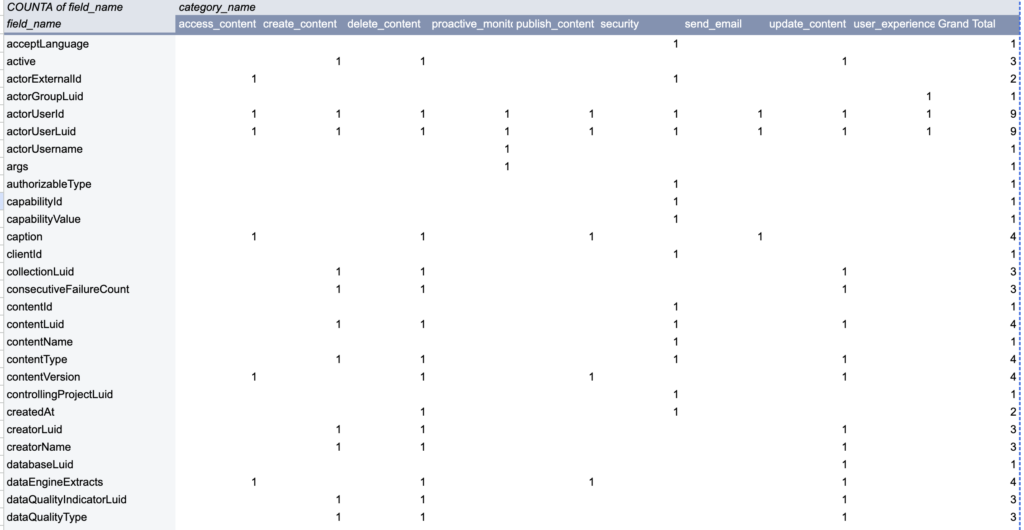
Why This Architecture Holds Up
The Pseudo-CSV staging layer is deliberately dumb — and that’s the point. It doesn’t care what Tableau puts in the JSON. Whatever arrives gets stored as a string. The structure is enforced downstream, in Dataform, where we have full control.
Three things this buys us:
– Resilience If Tableau adds, removes, or renames fields tomorrow, the ingestion layer doesn’t break. We update the JavaScript array and redeploy.
– Dry code One schema definition drives everything. No duplication, no drift between what’s in the table and what’s in the documentation.
– Performance. Partition by time, cluster by category. The Silver Layer is ready for dashboards and ad-hoc analysis without surprises on the billing side.
Decoupling ingestion from transformation is not a new idea. But on a dataset this polymorphic, it’s the only approach that actually scales.

Leave a Reply